

As an Amazon Associate I earn from qualifying purchases.
Your front door gets more use than any other lock in the house, and it is the one burglars try first. The best smart lock for that door keeps the strong deadbolt you need, then adds keyless entry, auto-lock, guest codes and an alert on your phone when someone comes home.
This guide compares six front door smart locks: full deadbolt replacements with keypads or fingerprint readers, a lock that hides inside a normal-looking deadbolt, and a retrofit that keeps your existing keys. For each one we say plainly which smart home it works with: Alexa, Google Home, Apple Home or Matter.
| Product | Best for | Our rating | |
|---|---|---|---|
 Schlage Encode Plus | Best overallTop BHMA residential rating, built-in Wi-Fi and Apple Home Key | ★★★★½ 4.5/5 | Check price |
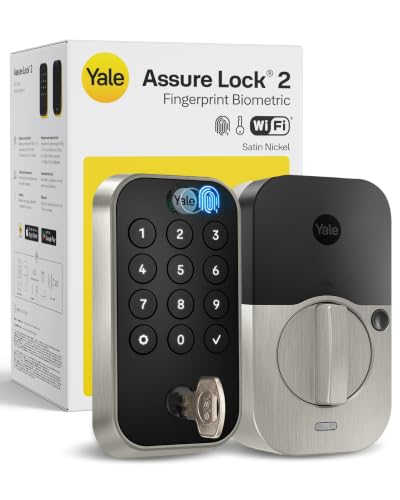 Yale Assure Lock 2 Touch | Best fingerprint lockFast fingerprint unlock with Wi-Fi, auto-unlock and auto-lock | ★★★★½ 4.5/5 | Check price |
 Kwikset Halo Select Plus | Best for mixed smart homesWi-Fi plus Matter, Apple Home Keys and up to 250 codes | ★★★★½ 4.5/5 | Check price |
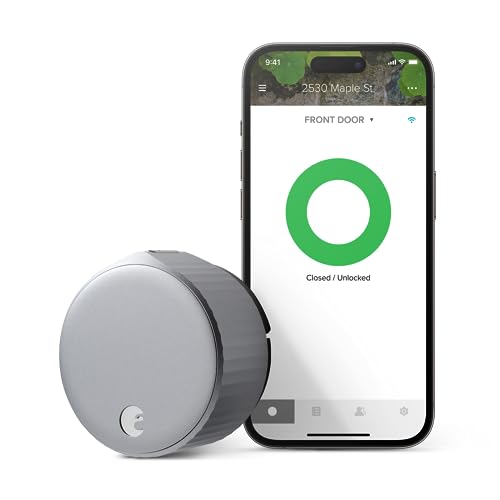 August Wi-Fi Smart Lock | Best for rentersFits over your current deadbolt so your keys still work | ★★★★☆ 4/5 | Check price |
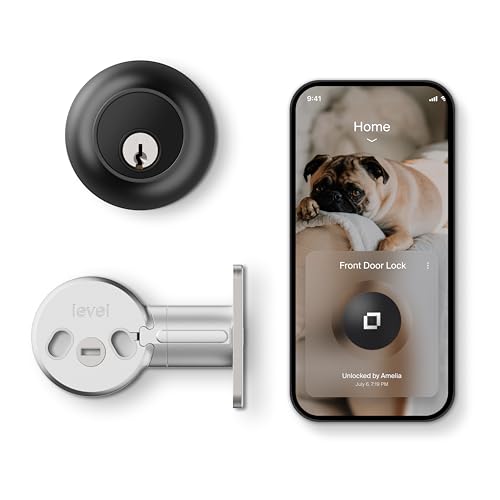 Level Lock (Matter) | Best hidden lockLooks like a plain deadbolt, Matter over Thread, AAA BHMA | ★★★★☆ 4/5 | Check price |
 eufy Smart Lock C220 | Budget pickFingerprint, keypad and Wi-Fi with about 8 months per battery set | ★★★½☆ 3.5/5 | Check price |
How we picked the best smart locks for front doors
We read each maker’s specs and certification claims and compared the details that matter on an exterior door. We did not run lab or break-in tests, so we stick to what the specs and the security certifications tell you.
The star ratings are our own editorial scores for how well each lock fits this job: a secure, easy-to-live-with lock on the main entry door.
Already use Ring Alarm or a Ring doorbell? Our guide to smart locks that work with Ring Alarm and Ring Doorbell covers the Z-Wave locks and Ring app control. This roundup looks at the front door itself, whatever system you run.
1. Schlage Encode Plus: best overall
Schlage Encode Plus
Top-grade deadbolt with Wi-Fi and Apple Home Key built in
Schlage's highest residential BHMA rating, up to 100 codes, a built-in alarm, and tap to unlock with an iPhone or Apple Watch.
The Schlage Encode Plus is the lock we would put on most front doors. Schlage says it carries the highest residential BHMA rating for security, durability and finish, so the deadbolt itself is as tough as the best plain locks you can buy. The smart features sit on top of that.
It has built-in Wi-Fi, so there is no hub to buy for remote control in the Schlage Home app. You can store up to 100 access codes, check lock history and set notifications. It works with Apple Home and Apple Home Key, so you can tap an iPhone or Apple Watch to unlock, plus Alexa and Google Assistant for voice control.
The drawback is price: it is one of the most expensive locks here. If you never use Apple Home Key, the original Schlage Encode costs less and keeps the same keypad and Wi-Fi.
2. Yale Assure Lock 2 Touch: best fingerprint smart lock
Yale Assure Lock 2 Touch
Unlock with a fingertip in under half a second
A fingerprint reader and keypad on a Wi-Fi deadbolt, with auto-unlock as you arrive and auto-lock behind you.
If you want to stop typing codes altogether, the Yale Assure Lock 2 Touch with Wi-Fi puts a fingerprint reader on the keypad. Yale quotes 99% accuracy and under half a second to recognize a finger, and you can still use a code or the key when your hands are wet or gloved.
It replaces your current deadbolt on most standard US entry doors with only a screwdriver. Wi-Fi is built in, and auto-unlock opens the door as you walk up with your phone, while auto-lock secures it behind you. Two-factor authentication and a matte keypad round out the security side.
The drawback is that 2.4 GHz requirement, plus a keyed cylinder that some buyers will want to skip. For a household with kids who lose keys, the fingerprint reader is worth it.
3. Kwikset Halo Select Plus: best for mixed smart homes
Kwikset Halo Select Plus
One lock for Apple, Google and Alexa households
Wi-Fi and Matter, Apple Home Keys, up to 250 access codes, and a built-in door status sensor that knows when the door is shut.
Not everyone in a house uses the same phone or the same voice assistant. The Kwikset Halo Select Plus covers almost everyone: it has Wi-Fi and Matter, works with Alexa, Google Home and Apple Home, and supports Apple Home Keys for tap to unlock with an iPhone or Apple Watch.
It can hold up to 250 access codes, which is generous for families, dog walkers and cleaners. A built-in door status sensor tells you whether the door is actually shut, not just locked, and intrusion detection flags tampering. Geofencing can unlock it as you arrive home.
The drawback: like the Schlage, there is no fingerprint reader, and it costs more than the basic Halo Select. If Matter and Apple Home Key matter to you, the Plus is the one to get.
4. August Wi-Fi Smart Lock: best for renters and keeping your keys
August Wi-Fi Smart Lock
Make your current deadbolt smart and keep your keys
Fits over the inside thumbturn in about 10 minutes, with built-in Wi-Fi, DoorSense auto-lock and wide smart home support.
The August Wi-Fi Smart Lock does not replace your deadbolt. It fits over the thumbturn on the inside of the door, so the outside looks the same and every key you already have still works. August says the install takes about 10 minutes on most single-cylinder deadbolts.
That makes it the pick for renters, or anyone who likes their current deadbolt. Built-in Wi-Fi means no bridge, and August lists Alexa, Google Assistant, Apple HomeKit and SmartThings. DoorSense, a small sensor on the frame, lets auto-lock wait until the door is really closed.
The drawback is that there is no keypad on the outside unless you add one. If you want codes or fingerprints at the door, look for the Yale bundle of this lock that adds the Keypad Touch.

5. Level Lock (Matter): best hidden smart lock
Level Lock (Matter)
A smart lock that looks like a regular deadbolt
The motor and battery hide inside the bolt, with Matter over Thread for Apple Home, Google Home and Alexa.
Some people want smart features without a keypad on the front of the house. The Level Lock hides the motor and battery inside the deadbolt itself, so from the porch it looks like a regular lock. Level says it is certified AAA by BHMA and ANSI Grade 1.
You unlock it with the Level Home app, your phone or a normal key. It uses Bluetooth plus Matter over Thread, so it works with Apple Home, Google Home, Alexa and SmartThings. Remote control and away-from-home alerts need a Matter over Thread hub and border router, such as a recent Apple TV, HomePod mini or Nest Hub.
The drawback: without a Thread border router it is a Bluetooth lock that works only near the door, and there is no keypad for guests without the app.
6. eufy Smart Lock C220: budget pick
eufy Smart Lock C220
Fingerprint and Wi-Fi at the door for a low price
Six ways to unlock, built-in Wi-Fi with no bridge, and around 8 months from a set of AA batteries.
The eufy Smart Lock C220 brings a fingerprint reader, keypad and built-in Wi-Fi to the front door for about the price of a plain keypad lock. eufy lists six ways in: fingerprint, app, keypad, key, Apple Watch, and voice with Alexa or Google Assistant.
It runs on 8 AA batteries for around 8 months, has an IP53 weather rating, and needs no bridge. If you already have a eufy doorbell, the lock joins the same eufy Security app. Our roundup of video doorbells without a subscription covers eufy’s doorbells too.
The drawback is security grade. eufy lists BHMA Grade 3, the entry level, while the Schlage and Level carry the top grade. No Apple Home support is listed either.
Buying guide: how to choose a smart lock for your front door
All six locks lock and unlock from your phone. These are the choices that decide which one is the best smart lock for your door.
Security grade: what BHMA Grade 1, 2 and 3 mean
The Builders Hardware Manufacturers Association sets the ANSI/BHMA standards for locks. Its product grade levels run from Grade 1 to Grade 3, with Grade 1 the highest, and certified products are tested for cycles, operation, strength, security and finish. For a front door, look for Grade 1 or 2, or the top AAA residential rating.
Grade only covers the lock. Check the door, the frame and the hinges too, since a solid deadbolt on a weak frame is still a weak door.
Replacement deadbolt or retrofit
A replacement smart deadbolt, like the Schlage, Yale, Kwikset, Level and eufy, swaps out your whole lock. A retrofit, like the August, keeps your deadbolt and adds a motor inside. Renters and anyone who wants to keep their keys should start with a retrofit.
Wi-Fi, Thread and Matter
Wi-Fi locks connect straight to your router and need no hub, but they use more battery. Thread locks sip power and respond fast, but need a Thread border router for remote control. Matter is the shared standard that lets one lock work with Apple Home, Google Home, Alexa and SmartThings at once. The Kwikset Halo Select Plus and Level Lock both support it.
Keypad, fingerprint or phone
Keypads are easiest for guests. Fingerprint readers suit families with kids. Apple Home Key and auto-unlock are the most hands-free for phone users. Pair the lock with a door sensor if you want an alert whenever the door opens, and see our smart padlock picks for sheds and gates.

Frequently asked questions
What is the best smart lock for a front door?
For most homes it is the Schlage Encode Plus. Schlage says it carries the top residential BHMA rating, it has built-in Wi-Fi, and it works with Alexa, Google Assistant and Apple Home Key. If you want a fingerprint reader, choose the Yale Assure Lock 2 Touch instead.
Are smart locks safe on a front door?
A good one is as strong as a plain deadbolt, since the bolt does the work. Look for a stated BHMA grade, keep the app account secured with two-factor sign-in, and reinforce the strike plate. Every lock here also keeps a physical key or a backup way in.
What happens if the smart lock battery dies?
You get low-battery warnings in the app for weeks first. If it does run flat, most locks keep a physical key, and some, like the eufy Smart Lock C220, add more ways in. Swap batteries when the first warning appears rather than waiting.
Can I install a smart lock if I rent?
Usually yes, with a retrofit. The August Wi-Fi Smart Lock fits over the inside thumbturn of your current deadbolt, so your landlord’s keys still work and you can take it with you when you move. Check your lease before changing any lock.